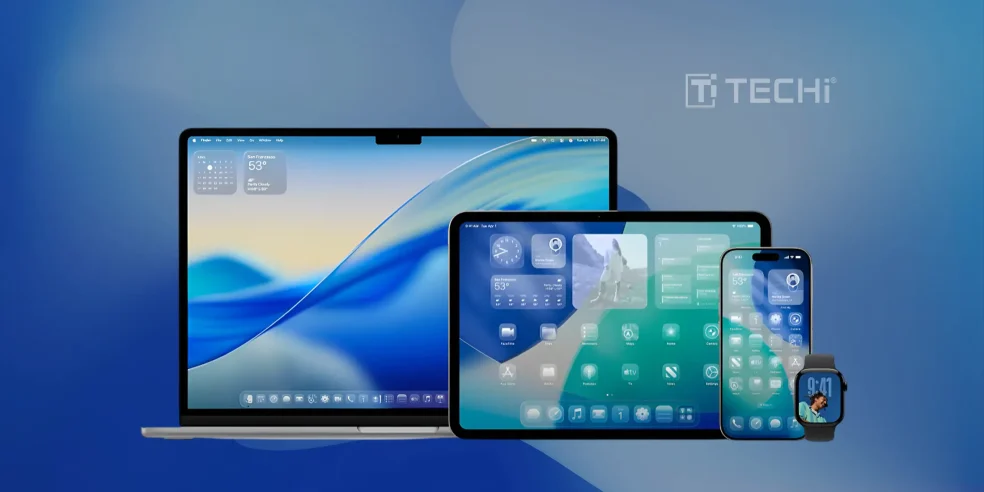
During this year’s WWDC, Apple didn’t just introduce a facelift, it released an aesthetic revolution so refined that it is sparkling at us through Liquid Glass. It’s software, but it’s couture. Regardless of whether the user is a minimalist, a maximalist, or simply someone who enjoys the plain pleasure of a perfectly rounded edge, welcome to Apple’s most visually adventurous chapter yet. Apple has again set the bar higher for its visual appearance through software aesthetics with a sweeping new design philosophy based on beauty, simplicity, and harmony across platforms.
At its 2025 Worldwide Developers Conference, the technology giant unveiled a revolutionary visual transformation software design that redefines how people interact with their devices. At the center of this revolution is Liquid Glass, which is a liquid, transparent design material that reflects and refracts its environment in real-time, infusing apps, controls, and system components with a breathtaking layer of energy and responsiveness.
This new material is not merely about visual pop; it changes dynamically with light and context, altering how people experience and interact with content. As Apple’s VP of Human Interface Design, Alan Dye said,
“At Apple, we’ve always believed in the deep integration of hardware and software that makes interacting with technology intuitive, beautiful, and delightful. This is our broadest software design update ever. Meticulously crafted by rethinking the fundamental elements that make up our software, the new design features an entirely new material called Liquid Glass. It combines the optical qualities of glass with a fluidity only Apple can achieve, as it transforms depending on your content or context. It lays the foundation for new experiences in the future and, ultimately, it makes even the simplest of interactions more fun and magical.”
It Extends To Every Screen 🔗
For the first time, Apple’s design update is shared throughout its platform universe, across iOS 26, iPadOS 26, macOS Tahoe 26, watchOS 26, and tvOS 26.1. Each environment maintains its individual character, but shares a consistent visual language that improves continuity across devices for users.
Liquid Glass’ transparent sorcery spreads from tiny interface items, such as buttons, sliders, and toggles, to essential system experiences like Lock Screen, Control Center, and Home Screen. The material brings depth and animation, adjusting subtly according to the users’ wallpaper, app content, or light surroundings to develop an intimate and enchanting experience.
Innovative App Interfaces 🔗
Apple’s designers have gone about modernizing the core apps while keeping their structure and navigation instantly recognizable. Users will discover elegant toolbars, smarter navigation, and adaptable controls crafted from Liquid Glass in apps such as Safari, Camera, Photos, Music, and FaceTime. These modernized components float atop the app’s own content and change elegantly with users’ interaction, offering contextual functionality without bombarding the screen.
The navigation elements in apps, such as tab bars and sidebars, have all been elegantly reimagined. On iOS 26, tab bars shrink smartly on scrolling, drawing attention to the content but not at the expense of navigation. Sidebars on iPadOS and macOS beautifully interact with the surrounding wallpaper and refract visual cues from the content nearby, providing context and charm, especially in applications like Apple TV and Podcasts.
Personalized Enhancements Experience 🔗
Apple didn’t leave the interface elements alone, the platform-specific particulars also got a makeover. The Lock Screen clock, for instance, is rendered in Liquid Glass and blending subtly into photo backgrounds. On the desktop and Home Screen, Dock, icons, and widgets have specular highlights and multilayered depth, allowing for bright customization while still maintaining functional clarity.
With macOS 26, Apple launches a fully transparent menu bar, enabling wider visual real estate. Desktops can now be personalized with fresh icon tints and widget animations that adapt to light and dark modes. Across the board, this design update brings in refinement and joy without compromising user recognition.
Toolkit to Build Tomorrow 🔗
To facilitate the transition into this attractive new paradigm of application creation, Apple has also published new APIs in SwiftUI, UIKit, and AppKit for third-party developers. Liquid Glass aesthetics and dynamic controls are now readily available throughout new UI conventions. Apps that really feel part of the new design age can now be created by developers through such tools, making the experience much more natural and emotionally rich for users in interacting with the application. With such a tool set, Apple makes a great invitation to the developer community towards a bigger transition, which is making all touch, swipe, and scroll more expressive, beautiful, and magical.
Back to Basics 🔗
Apple’s revamped design aligns with it, keeping its long-held belief in the tight integration of hardware and software, along with encouraging and embracing the expectations of users who would want more than just its product’s utility. Apple’s signature innovation, Liquid Glass has not only set a standard around which future user interface design will be set, rather it doubles the efforts in what extends towards an ecosystem which has a unique feeling of a human.
With this radical rethinking, Apple isn’t simply improving software looks, it’s making a philosophical statement that technology can evoke emotional connection. Liquid Glass isn’t so much a graphical feast, it’s an assertion of elegance and intentionality in digital life. In a world where software updates tend to emphasize utility or speed in isolation, Apple takes us back to basics by reminding us that technology’s ability to make us feel something is just as critical as what it can accomplish. It’s a lovely rebellion against the mundane, and a master class in how design, when executed to perfection, can make even the most mundane interaction a little bit magical.