
Apple has released the latest version of the iPhone operating system, iOS 26. It can now be downloaded and will be compatible with iPhones starting with the second-generation iPhone SE and the iPhone 11.
The update will include a redesigned interface, new functions, and new tools, which will aim to make iPhones more useful in their daily operation. Some aspects can be termed as pure recreation, but some are aimed at solving an old problem, like telephonic intrusions that are not sought, and also the wastage of time by computer-based hold systems.
In this paper, the key changes will be broken down, their mechanisms of operation explored, and the implications of the changes on the users of the iPhone explained.
The Significance of iOS 26 🔗
The release of iOS products is always met with a significant level of attention, as it represents a point of reference in regards to how iOS users all over the globe engage with their products.
Apple had several design choices in this case. The company implemented the aesthetics of the interface, added the option of live translation of the situations of conversations, and added pragmatic features, spam filtering, and Hold Assist.
At the same time, Apple failed to meet all its proclaimed promises, the most notable one being the expected improvement of intelligence of Siri that is yet to be completed.
The update is also indicative of a branding move by Apple. Apple shifted to the year-based naming system by abandoning the sequential numbering system approach. Therefore, iOS 18 was the last upgrade of the former system, and the next version is known as iOS 26.
Apple has made it clear that future operating systems will follow this new chronological structure, making iOS, macOS, and iPadOS, among others, OSes that share a single numeral.
Liquid Glass is an aesthetic innovation 🔗
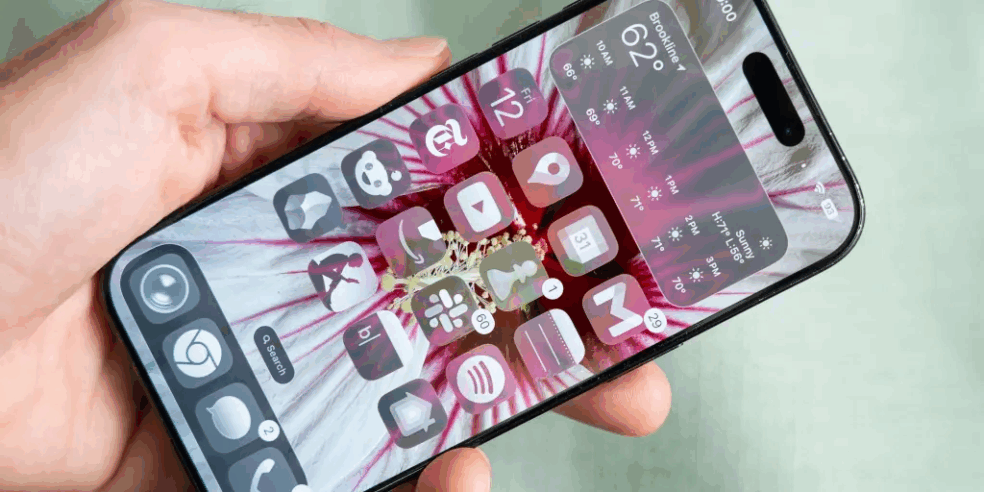
The most notable graphic change that users will be introduced to is the Liquid Glass design. This idea, the menus and icons become more transparent and have an illusion of frosted Glass.
Icons have a modern, minimalistic style, and the effect is best realised on scrolling or touch. The interface has movement, distortion of images that are based on refraction, and elasticity that have been designed to help express fluidity.
Although Liquid Glass is more than just a veneer augmentation, the effect it has on children’s usage is approximately insignificant. Certain customers might have difficulty reading clear menus; therefore, Apple has incorporated an accessibility feature to reduce transparency or increase contrast.
All in all, the design provides a bold look that does not radically transform the working processes in iOS.
Live Translation: Linguistic barriers, overcome 🔗
Live language translation is one of the most interesting things that iOS has done in iOS 26. Apple has integrated this in Messages, FaceTime, and telephonic messages.
In Messages, the recipient can choose to have the incoming messages automatically translated, and the reply can also be translated before being sent out, thus allowing the two speakers to communicate in their respective languages without difficulties.
When using FaceTime, spoken words create live subtitles on the screen in the translated language, which can help interlocutors not proficient in the original language.
Apple goes one step further in telephone calls, using synthesised voice to read the words spoken by the caller and instantly translate them to the language of the user, with onscreen text appearing simultaneously.
These potentials, as good as they may sound, are, however, not perfect. The performance is limited by translation latency, misunderstandings of fillers, and a small repertoire of language.
Nevertheless, the feature highlights the emerging potential of artificial intelligence in iPhones and reveals a possibility to change the lucrative communication of several customers.
Spam Calls and Texts Mitigation 🔗
Mobile phone calls and text messages are a form of omnipresent spamming to the occupants of the phone. To deal with this, Apple has come up with an optional filtering mechanism which separates unknown callers and text messages. Messages that unidentified persons receive are separated into a separate area of the Messages app.
Still, unsolicited calls do not ring and ask the user to provide a short explanation to the caller, which the user may accept or deny.
The process is similar to that of the call-screening solution offered by Google, but it has a simplified process. Early adopters report fewer interruptions, which will be assessed longitudinally. The feature implies a gradual move towards a reduction in scams and spam.
Hold Assist: Maximizing Time Allocation When taking calls 🔗
The general irritation that comes with a protracted wait time is solved through the Hold Assist feature, which maintains position in a call queue. When the user puts a call on hold, they can enable Hold Assist, which causes the machine to resume connection as soon as an agent is available automatically.
Functional testing is reliable, but sometimes there are some problems when the returning party has already started talking, and the user has not returned yet. Nevertheless, Hold Assist remains an exceptionally useful app that can be added to iOS 26 to save time and minimise the frustration of clients.
Apple has introduced other improvements to make text messaging better 🔗
Backgrounds in chats: Chatters can now use animated and photographic backgrounds in conversations, adding colour and personality to what they are saying.
- Polls in group chats: Group members can now vote in the chat, and this new tool helps in event planning, but without a deadline set up.
- Group typing: Like one-to-one conversations, customers will have indicators showing that others are typing at the same time.
These additions make interactions within a given group more active and interactive, which helps to maintain iMessage competitiveness against WhatsApp and Telegram.
Developments in Visual Intelligence: Intelligent screenshot use 🔗
Apple has expanded the Visual Intelligence tool to include screenshots. Once a screenshot is taken, the user is now able to search images, add dates to their calendar, or ask ChatGPT to explain them around the image.
As an example, the availability of an event date in a screenshot makes it possible to insert a calendar with one press of a button. It enables one to search for a specific object in particular.
The aspect above underscores the fact that artificial Intelligence Is Increasingly being devoted to iPhones, but it is also indicative of the limitations that Siri currently encounters as it remains less responsive and comprehensive than Android applications like Google Circle to Search.
Smaller but Useful Features 🔗
- iOS 26 includes a few small but significant features to make everyday use easier
- Olsolezy et al. (2015) suggest that the Password History feature in the Passwords app can be used to retrieve outdated credentials.
- Customization of alarm snooze provides the user a chance to set snooze between one and fifteen minutes.
- An isolated photo library returns allow further application of distinction between the roll of the camera and the photographed collections.
Such changes can seem insignificant, but due to their fix of small inconveniences over time, such changes are effective.
What’s Missing: The Smarter Siri 🔗
A year prior, Apple had been advertising its Apple Intelligence AI system, but the smarter Siri was not included in iOS 26. As Visual Intelligence, live translation makes a step forward; Siri does not change much. As a result, Apple is under the competes with Google and OpenAI that have more competent AI assistants.
Concluding Views 🔗
iOS 26 represents a bold update. Apple has transformed the iPhone design, added new ambitious features like live translation and Hold Assist, and made minor but useful changes to messaging, managing passwords and photography. At the same time, the update reveals the weakness of the current AI tool Apple has, as Siri remains below standards.
iOS 26 will make the iPhone more colourful and user-friendly for most users. Liquid Glass design might put off the subscribers, yet the Liquid Glass business also adds definite value to day-to-day life with spam filtering and Hold Assist options.
With iOS 26, Apple is building a platform upon which its future updates may be based and the newest release provides users with plenty of content to explore at the moment.